Moz Q&A is closed.
After more than 13 years, and tens of thousands of questions, Moz Q&A closed on 12th December 2024. Whilst we’re not completely removing the content - many posts will still be possible to view - we have locked both new posts and new replies. More details here.
How to stop Google crawling after 301 redirect?
-
I have removed all pages from my old website and set 301 redirect to new website. But, I have verified old website with Google webmaster tools' HTML verification file which enable me to track all data and existence of pages in Google search for my old website. I was assumed that, Google will stop crawling and DE-indexed all pages after 301 redirect. Because, I have set 301 redirect before 3 months.
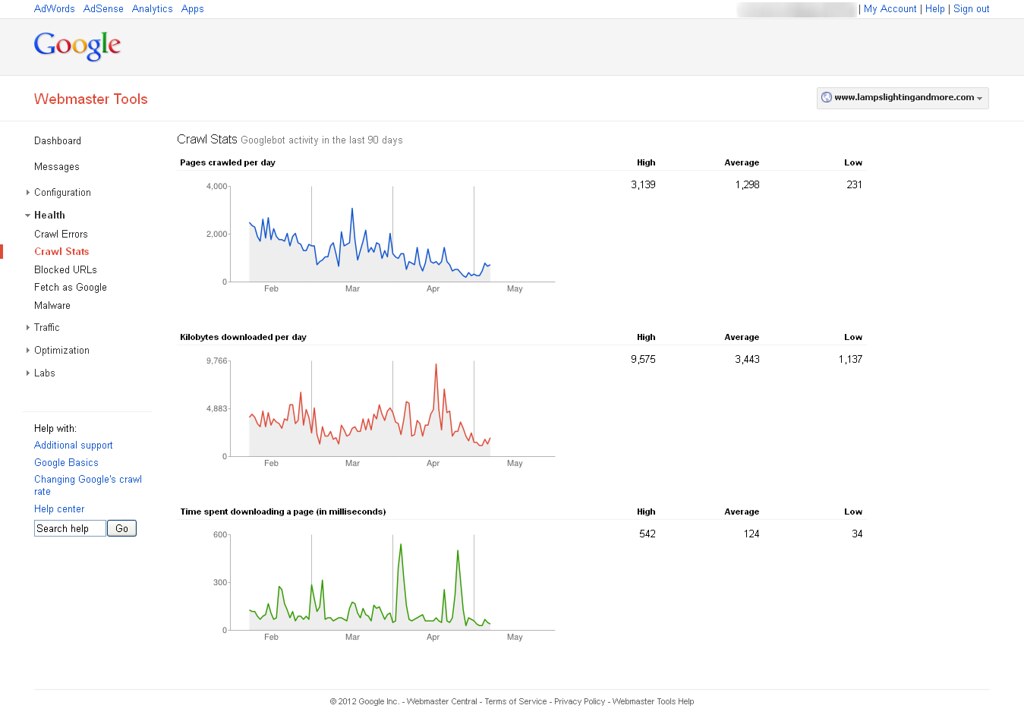
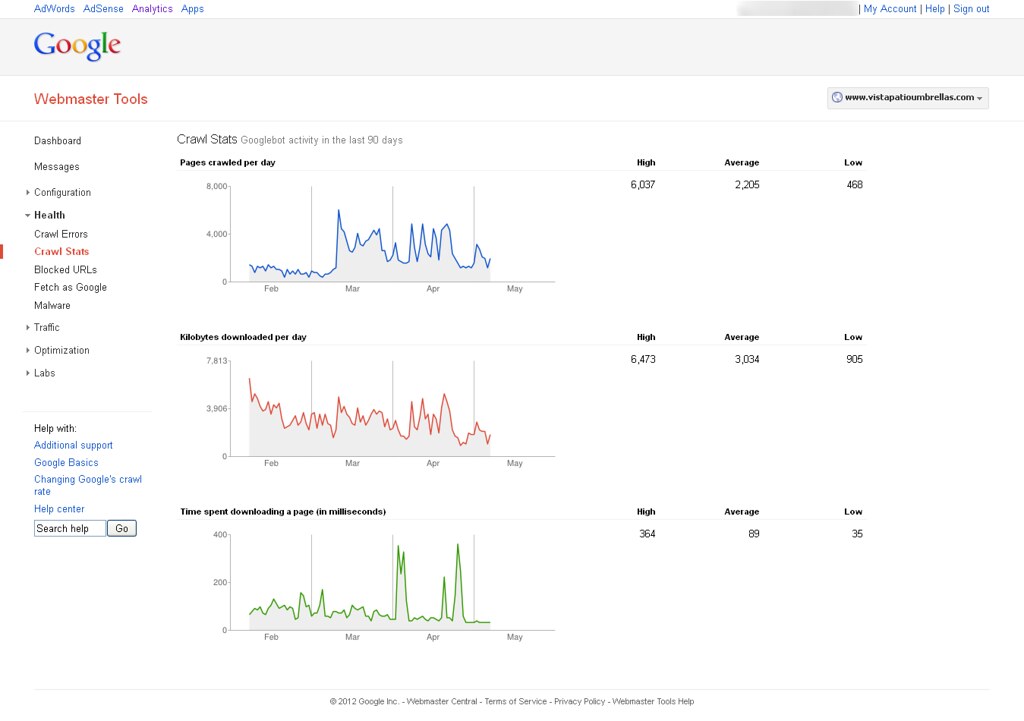
Now, I'm able to see Google bot activity on my website with help of Google webmaster tools. You can find out attachment to know more about it. How can it possible & How Google can crawl removed pages?
You can see following image to know more about it.
&
-
Google is most likely following links on other sites pointing to your old site and then 301'ing to the new site so you're seeing activity in WMT
looking here is still see two pages in the index:
you can go in and remove the site in WMT using the remove URL tool and see if that stops activity in that old WMT account. Crawling or not crawling, reporting or not reporting, there is not an issue here though - the 301's appear to be properly set up.


Browse Questions
Explore more categories
-
Moz Tools
Chat with the community about the Moz tools.
-
SEO Tactics
Discuss the SEO process with fellow marketers
-
Community
Discuss industry events, jobs, and news!
-
Digital Marketing
Chat about tactics outside of SEO
-
Research & Trends
Dive into research and trends in the search industry.
-
Support
Connect on product support and feature requests.
Related Questions
-

How to handle potentially thousands (50k+) of 301 redirects following a major site replacement
We are looking for the very best way of handling potentially thousands (50k+) of 301 redirects following
Intermediate & Advanced SEO | | GeezerG
a major site replacement and I mean total replacement. Things you should know
Existing domain has 17 years history with Google but rankings have suffered over the past year and yes we know why. (and the bitch is we paid a good sized SEO company for that ineffective and destructive work)
The URL structure of the new site is completely different and SEO friendly URL's rule. This means that there will be many thousands of historical URL's (mainly dynamic ones) that will attract 404 errors as they will not exist anymore. Most are product profile pages and the God Google has indexed them all. There are also many links to them out there.
The new site is fully SEO optimised and is passing all tests so far - however there is a way to go yet. So here are my thoughts on the possible ways of meeting our need,
1: Create 301 redirects for each an every page in the .htaccess file that would be one huge .htaccess file 50,000 lines plus - I am worried about effect on site speed.
2: Create 301 redirects for each and every unused folder, and wildcard the file names, this would be a single redirect for each file in each folder to a single redirect page
so the 404 issue is overcome but the user doesn't open the precise page they are after.
3: Write some code to create a hard copy 301 index.php file for each and every folder that is to be replaced.
4: Write code to create a hard copy 301 .php file for each and every page that is to be replaced.
5: We could just let the pages all die and list them with Google to advise of their death.
6: We could have the redirect managed by a database rather than .htaccess or single redirect files. Probably the most challenging thing will be to load the data in the first place, but I assume this could be done programatically - especially if the new URL can be inferred from the old. Many be I am missing another, simpler approach - please discuss0 -

Moving html site to wordpress and 301 redirect from index.htm to index.php or just www.example.com
I found page duplicate content when using Moz crawl tool, see below. http://www.example.com
Intermediate & Advanced SEO | | gozmoz
Page Authority 40
Linking Root Domains 31
External Link Count 138
Internal Link Count 18
Status Code 200
1 duplicate http://www.example.com/index.htm
Page Authority 19
Linking Root Domains 1
External Link Count 0
Internal Link Count 15
Status Code 200
1 duplicate I have recently transfered my old html site to wordpress.
To keep the urls the same I am using a plugin which appends .htm at the end of each page. My old site home page was index.htm. I have created index.htm in wordpress as well but now there is a conflict of duplicate content. I am using latest post as my home page which is index.php Question 1.
Should I also use redirect 301 im htaccess file to transfer index.htm page authority (19) to www.example.com If yes, do I use
Redirect 301 /index.htm http://www.example.com/index.php
or
Redirect 301 /index.htm http://www.example.com Question 2
Should I change my "Home" menu link to http://www.example.com instead of http://www.example.com/index.htm that would fix the duplicate content, as indx.htm does not exist anymore. Is there a better option? Thanks0 -

Hacked website - Dealing with 301 redirects and a large .htaccess file
One of my client's websites was recently hacked and I've been dealing with the after effects of it. The website is now clean of malware and I already appealed to Google about the malware issue. The current issue I have is dealing with the 20, 000+ crawl errors which are garbage links that were created from the hacking. How does one go about dealing with all the 301 redirects I need to create for all the 404 crawl errors? I'm already noticing an increased load time on the website due to having a rather large .htaccess file with a couple thousand 301 redirects done already which I fear will result in my client's website performance and SEO performance taking a hit as well.
Intermediate & Advanced SEO | | FPK0 -

Google Adsbot crawling order confirmation pages?
Hi, We have had roughly 1000+ requests per 24 hours from Google-adsbot to our confirmation pages. This generates an error as the confirmation page cannot be viewed after closing or by anyone who didn't complete the order. How is google-adsbot finding pages to crawl that are not linked to anywhere on the site, in the sitemap or linked to anywhere else? Is there any harm in a google crawler receiving a higher percentage of errors - even though the pages are not supposed to be requested. Is there anything we can do to prevent the errors for the benefit of our network team and what are the possible risks of any measures we can take? This bot seems to be for evaluating the quality of landing pages used in for Adwords so why is it trying to access confirmation pages when they have not been set for any of our adverts? We included "Disallow: /confirmation" in the robots.txt but it has continued to request these pages, generating a 403 page and an error in the log files so it seems Adsbot doesn't follow robots.txt. Thanks in advance for any help, Sam
Intermediate & Advanced SEO | | seoeuroflorist0 -

How can I make sure Google is crawling a link from an iframe (video)?
Do they crawl backlinks from an iframe example from a Youtube video embedded in a blog post? TIA!
Intermediate & Advanced SEO | | zpm20140 -

301 vs 410 redirect: What to use when removing a URL from the website
We are in the process of detemining how to handle URLs that are completely removed from our website? Think of these as listings that have an expiration date (i.e. http://www.noodle.org/test-prep/tphU3/sat-group-course). What is the best practice for removing these listings (assuming not many people are linking to them externally). 301 to a general page (i.e. http://www.noodle.org/search/test-prep) Do nothing and leave them up but remove from the site map (as they are no longer useful from a user perspective) return a 404 or 410?
Intermediate & Advanced SEO | | abargmann0 -

301 redirect with /? in URL
For a Wordpress site that has the ending / in the URL with a ? after it... how can you do a 301 redirect to strip off anything after the / For example how to take this URL domain.com/article-name/?utm_source=feedburner and 301 to this URL domain.com/article-name/ Thank you for the help
Intermediate & Advanced SEO | | COEDMediaGroup0 -

301 doesn't redirect a page that ends in %20, and others being appended with ?q=
I have a product page that ends /product-name**%20** that I'm trying to redirect in this way: Redirect 301 /products/product-name%20 http://www.site.com/products/product-name And it doesn't redirect at all. The others, those with %20, are being redirected to a url hybrid of old and new: http://www.site.com/products/product-name**?q=old-url** I'm using Drupal CMS, and it may be creating rules that counter my entries.
Intermediate & Advanced SEO | | Brocberry0